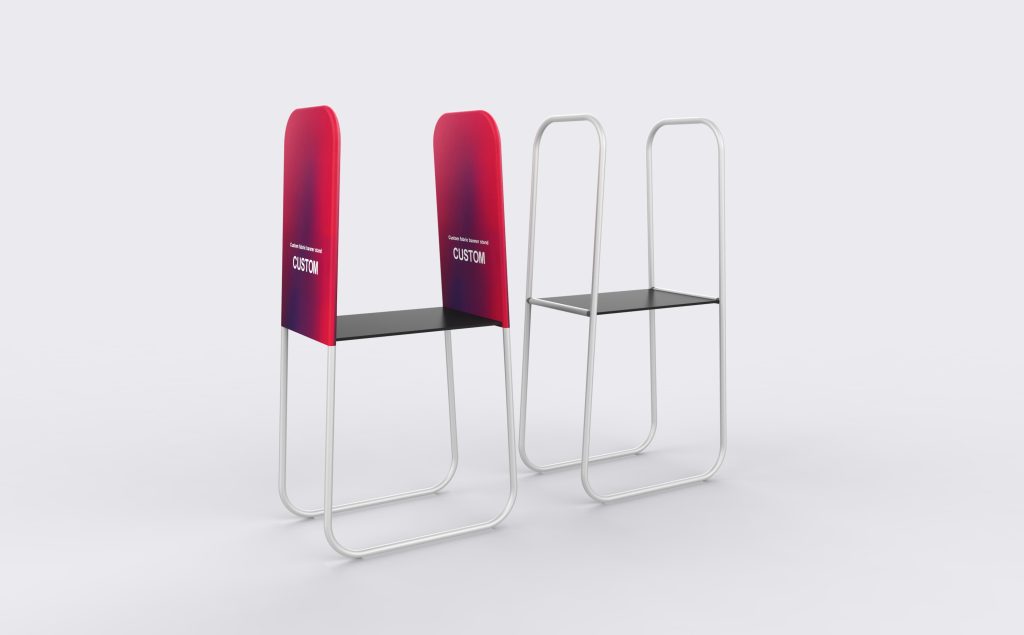
Modular Combination Banner Stand
Two tall graphic panels frame a central display surface, bringing the brand message and the item on show into one arrangement. Use the centre for the product presentation and the upper fabric areas for its name, benefits or campaign graphics.
Fit the stand around the item you want to show
Usable surface comes first
Measure the sample and any stand or base beneath it. Allow room to handle the item without reaching around the side frames. Its total weight and position determine the support proposal; the overall banner width does not specify the usable surface area.
Leave room to approach and work
Set the working height around the presentation. Check the complete frame footprint, the visitor approach and the route staff use to reach the item. Include cable or mounting space if equipment is part of the display.
Configuration details
Overall size and usable surface size serve different purposes. Include both on the approved drawing rather than treating a size label as a complete specification.
| Displayed arrangement | Two tall side frames, two upper fabric graphic areas and one central horizontal display surface |
|---|---|
| Listed size references | 5ft; 8ft. Specify overall width, height and depth for the selected build, plus the usable surface dimensions. |
| Custom order | 1 set minimum. Frame dimensions and printed graphics can be specified for the agreed project. |
| Artwork | Separate templates for the two fabric areas; custom print and replacement graphic options |
| Frame and connections | Final dimensions, joints and supplied display surface defined in the order configuration |
| Surface loading | Item dimensions, weight and position used to specify the supports and permitted load for the assembled build |
| Packing | Soft Bag listed as included; Hard Case optional. Packing arrangement confirmed for the completed set. |
Make the two graphics work as a pair
Keep the product name visible
Check the artwork with the intended sample or equipment in position. Place essential text above or beside the part that the item will cover, instead of relying on a clear view through the centre.
Align the shared elements
Treat the two fabric panels as separate pages of one presentation. Use consistent headline heights and image scale, but keep each message complete on its own panel. The opening in the center cannot carry the middle of a sentence or logo.
Use each panel’s own template
Keep important lettering away from the rounded top corners, seams and turned edges. Retain the approved files and frame dimensions for future replacement graphics.
Parts and accessories
- Frame Only
- Replacement Fabric Graphic
- LED Display Lights (2 pack)
- TV/Monitor Mount
List the selected parts individually in the order. Accessory names do not by themselves confirm the fitting arrangement or load capacity of this build.
Packing the complete set
Soft Bag is listed with the current configuration; Hard Case is optional. Confirm packing for the frame, fabric and central surface together, particularly when planning repeated transport between events.
Identify the surface and connecting parts in the supplied-items list so the packing plan accounts for the complete display.
Details to send for a proposal
Include the item’s dimensions and weight, required surface width, depth and working height, desired overall size, quantity and two-panel artwork. Add the visitor approach, staff access, any power or mounting needs, selected components, packing requirements, delivery destination and required date.
Questions about the combined display
Does Frame Only include the central surface?
The central surface is shown in the illustration, but the Frame Only label does not itemize it. Ask for the surface and its connecting hardware to be listed alongside the upright frames. This makes clear whether you are ordering the complete presentation arrangement or selected components.
What size of sample can I place in the centre?
Provide the sample’s width, depth, height and weight, including any base or accessories. The usable surface and its permitted load must suit that item. Check the sample in a front-view mock-up as well: a tall object can hide part of the two printed areas.
Can the stand support a TV or demonstration equipment?
TV/Monitor Mount is listed as an option. Send screen dimensions, weight, mounting pattern and the proposed position, along with any power or cable requirements. The mount and the frame support need to be specified together; the product render is not a load specification.
Can several combination stands connect into a longer display?
The name describes a combined display arrangement, but it does not establish unlimited linking or interchangeable joints. Send the number of units, desired arrangement and access openings. Connections, support positions and overall stability need to be specified for that complete layout.
Can I replace just one of the two graphics?
Mark the left or right panel as viewed from the front and send its original template and frame dimensions. Check shared colors and headline alignment against the graphic you are keeping. Matching the panel height alone does not establish that the cover will fit.