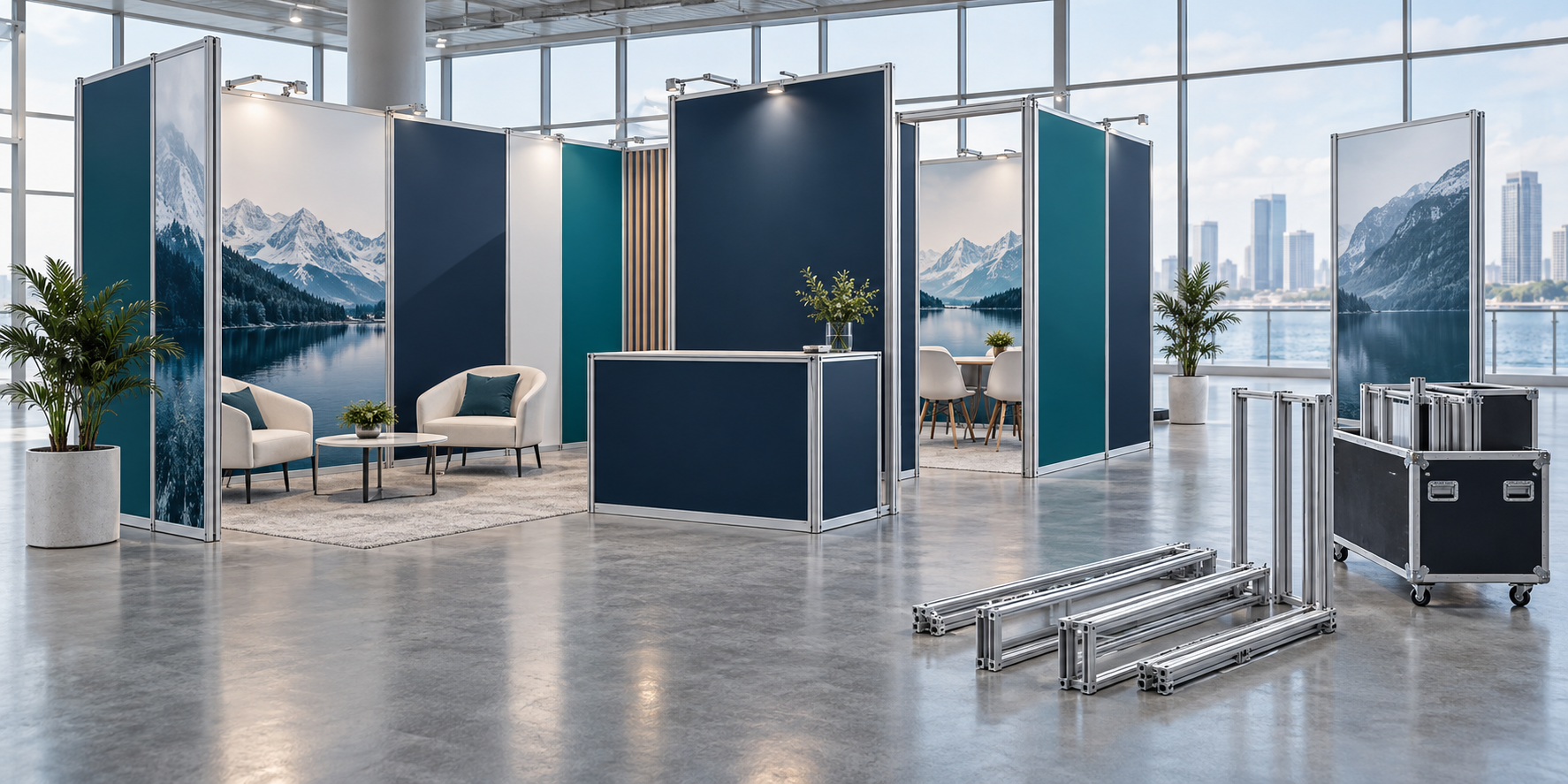
A modular exhibition stand is a reusable display system that can be rearranged for different booth sizes and event needs. It is most useful for companies that attend several exhibitions, reuse the same screens and counters, and want to update graphics without rebuilding the full booth.
Buying a modular stand does not always save money. You must compare its purchase price, transport, storage, setup, repairs and graphic updates with the full cost of renting an equal booth. The system should also work in your smallest, most common and largest event spaces. You can review common formats on Milin’s exhibition display solutions page.
What Is a Modular Exhibition Stand?
A modular exhibition stand is made from standard parts that connect in different ways. Common parts include:
- Aluminum frames and connectors
- Rigid wall panels
- Tension fabric graphics
- LED light boxes
- Counters and shelves
- Screen mounts
- Doors and storage rooms
- Flooring and transport cases
A reusable stand is not always modular. A custom stand may be stored and rebuilt in exactly the same layout. It is reusable, but it cannot easily change size or shape. A modular system should allow some walls, counters, graphics and accessories to be moved, removed or added.
For example, the same kit may create:
- A 3 × 3 meter booth with 9 square meters of floor space
- A 3 × 6 meter booth with 18 square meters of floor space
- A 6 × 6 meter island booth with 36 square meters of floor space
Before buying, ask the supplier to draw all three layouts. Each drawing should show the parts used, unused parts, storage position, screen locations, electrical points and graphics that must be replaced.
Component use is also important. Suppose a company owns 24 frame sections. Its 3 × 3 meter layout uses 12 sections, while its 3 × 6 meter layout uses 20. The smaller booth uses 50% of the frame inventory, and the larger booth uses about 83%. If the company normally books the smaller space, buying all 24 sections may create unnecessary storage and transport costs.
Who Should Buy One?
A modular exhibition stand is more likely to be useful when:
- You attend several exhibitions each year
- Your booth size changes but its main functions stay similar
- You regularly use the same screens, counters and product displays
- Your campaign message changes more often than the structure
- You have a dry and secure storage location
- Someone in your company can manage the inventory
- You expect to use the system for several years
There is no fixed number of events that makes buying cheaper. Two large local exhibitions may justify ownership, while six small international events may still be cheaper with local rental. The result depends on booth size, transport distance, local labor charges, storage costs and how much the design changes.
Buying may not be suitable when:
- Every event requires a completely different design
- Most shows are far from your storage location
- You do not have anyone to check and manage the parts
- Local rental is cheaper than shipping your own structure
- Most of the booth consists of one-use custom decorations
Main Benefits
Lower repeat costs. The main frame can be used again. Later events may only require transport, installation, venue services and selected graphic updates.
Different booth sizes. A planned set of parts can be reduced for a small booth or expanded for a larger space. This only works when the supplier designs the different layouts before production.
Faster planning. After the first event, your team already knows the case numbers, graphic sizes, screen positions, power needs and setup order. These records reduce repeated work.
Easier graphic updates. A company can replace one product image or campaign panel without replacing the full booth.
For example, assume a full set of graphics costs $4,000. If one campaign panel represents 20% of the printed area and the printer charges in proportion to the area, the basic print budget for that panel would be about $800. Artwork, finishing, shipping and rush charges would be added separately. This is a planning example, but it shows why smaller replaceable graphic sections can reduce update costs.
Consistent branding. The booth can keep the same logo position, main colors, counter design and lighting style even when the floor plan changes.
Less material waste. Reusing frames and cases may reduce the need to build and discard a new booth after every event. However, shipping distance, repair life, packed volume and graphic replacement must also be considered. The U.S. Environmental Protection Agency recommends looking at materials across their full life cycle, including production, use, reuse, maintenance and end-of-life management.[1]
ISO 20121:2024 also encourages event organizations to manage environmental, social and economic effects throughout event planning and delivery.[2]
Main Limits
Design limits. Standard frames may not support large unsupported spans, unusual roof shapes, heavy shelves or complex suspended structures. Custom parts can improve the appearance, but they may only fit one layout.
Storage work. The stand must be received, inspected, cleaned, counted, repaired and repacked after each event. A low monthly storage price may not include these services.
Missing parts. Small connectors, bolts, clips, shelf brackets and power supplies are easy to lose. One missing part can delay the full setup.
For a small or medium booth, carrying at least two spare units of each critical connector, cable or power supply is a practical starting point. Frequently used bolts and graphic clips may need four or more spares. The final quantity should depend on the number used in the stand and the supplier’s replacement time.
Repeated appearance. Using the same graphics and layout for years can make the booth look old. Plan to update selected graphics, furniture, lighting or product displays while keeping the reusable frame.
Supplier dependence. A system with special connectors or unusual graphic sizes may force you to buy every replacement from the original supplier. Ask whether other printers and contractors can produce compatible parts.
Main Types
Aluminum frame systems use profiles and connectors to form walls, rooms, towers and storage areas. They suit medium and large booths because they can carry screens, shelves and doors when correctly designed. Milin’s aluminum exhibition booth is an example of this format.
Check the maximum wall height, screen capacity, shelf capacity, bracing method and floor-fixing requirements. Do not judge strength only from the thickness of one profile. Connections, wall height, bracing and load position also affect stability.
Panel systems use rigid wall sections connected by posts or clips. They provide a solid surface for diagrams, product samples and shelves. Their main limits are visible joints, larger transport cases and possible damage to panel edges.
Tension fabric systems stretch printed fabric over a lightweight frame. They provide large graphic areas with fewer visible joints and are often easier to transport than large rigid panels. A tension fabric backdrop booth may work well for conferences, small exhibitions and branded backwalls.
Ask whether the fabric should be folded or rolled. Also check whether it can be washed and whether replacement graphics from different production batches can be color-matched.
Light-box systems place LED lighting behind printed fabric. They provide bright graphics but require more cables, drivers and electrical testing. Milin’s lightbox exhibition booth shows a common SEG fabric and LED format.
Inspect a working sample in normal exhibition lighting. Look for dark edges, bright spots, cable shadows, uneven corners, light leakage and color changes. Confirm whether LEDs and power supplies can be replaced without returning the full wall to the factory.
Portable systems include lightweight backwalls, collapsible frames, banners and small counters. They are useful for roadshows and smaller spaces, but one portable backwall may look undersized in a large island booth.
Hanging displays place branding above the booth so visitors can find it from a distance. A tension fabric hanging banner is one option, but venue rigging rules, total weight and approved contractors must be confirmed before ordering.
Large temporary structures and suspended displays should be designed, assembled and dismantled using proper safety controls.[3]
Plan the Booth Around Its Main Job
Start with the main purpose of the booth. A stand designed for fast lead collection needs a different layout from one used for product demonstrations or private meetings.
Choose one main goal:
- Attract more visitors
- Show a physical product
- Run live demonstrations
- Hold scheduled meetings
- Launch a new product
- Recruit distributors
- Collect qualified sales leads
Do not give every activity the same amount of space. Protect the areas that directly support the main goal.
Visitor flow. Keep the main entrance open. Avoid placing a large counter directly across the aisle unless you need controlled access. Screens and demonstrations should not force visitors to stop in the main walkway.
Storage. Calculate storage from real items, not only from the room’s floor area.
As a planning example, a four-person team may bring four bags, four coats, two cartons of brochures, one cleaning box, drinking water and several product packages. A cupboard that holds only two small cartons will not be enough, even if it looks acceptable in a design rendering.
Meeting areas. Allow space for chairs to move and for staff to walk around the table. A table for four people needs more space than the tabletop itself. Closed rooms may also need additional lighting, ventilation and venue approval.
Product displays. Give the supplier the exact product weight. Explain whether visitors will lift, push, rotate, open or operate the product. A static 2 kg sample needs less support than a 40 kg machine that visitors use throughout the day.
Plan Graphics, Screens and Lighting
Separate long-term brand graphics from short-term campaign content. Keep the logo, main colors and background stable, then place new products, offers and local-language messages on smaller replaceable sections.
Before choosing a graphic system, check:
- Replacement price
- Standard and rush production time
- Color matching between old and new graphics
- Cleaning instructions
- Packing method
- Whether another printer can produce compatible graphics
Milin’s article about interchangeable SEG fabric displays provides more information about replacing fabric graphics while keeping the main frame.
For every screen, provide:
- Exact model number
- Width, height and depth
- Total weight
- VESA mounting pattern
- Portrait or landscape position
- Power and cable locations
- Media player dimensions
- Whether visitors will touch the screen
“55-inch screen” is not enough information. As an example, one 55-inch screen may weigh 16 kg and use a 200 × 200 mm VESA pattern. Another may weigh 24 kg and use a 400 × 400 mm pattern. The wall and bracket must be designed for the exact model rather than the diagonal size alone.
Interactive screens also create extra movement because visitors press the display. The mount must support both the screen weight and the force created during use.
Keep electrical cables away from public walkways where possible. OSHA rules for exhibitions state that connectors and cable connections must not be placed in public traffic paths unless they are guarded, and wiring that may be damaged needs suitable protection.[4]
Estimate Setup Time
Setup time depends on booth size, graphics, lighting, screens, access time and installer experience. The following figures are planning examples, not guaranteed industry times:
| Example booth | Example team | Planning time |
|---|---|---|
| Portable backwall with one counter | 2 people | 30–90 minutes |
| 3 × 6 m modular booth with lights and one screen | 3–4 people | 3–6 hours |
| Larger booth with storage, several screens and raised flooring | Professional installation team | 8 hours or more |
Do not accept a setup time based only on opening the main frame. A complete test should include:
- Receiving and opening the cases
- Building the frame
- Installing all graphics
- Installing lights and power supplies
- Mounting screens
- Installing counters and shelves
- Placing furniture
- Completing final adjustments
- Removing or storing empty packaging
Record the number of people and total labor hours. For example, four installers working for five hours equals 20 labor-hours. This figure is more useful than only saying the booth takes five hours to build.
Check Transport and Packing
Request the following information before ordering:
- Total packed weight
- Weight of each case
- Number and size of cases
- Longest component
- Pallet and forklift requirements
- Whether cases can be stacked
- Whether cases fit through normal doors and elevators
- Whether a van, truck or airfreight shipment is needed
Do not compare systems only by case count. Compare their total packed volume.
For example, suppose a booth is packed into six cases, and each case measures 120 × 50 × 45 cm. The total case volume is:
1.2 m × 0.5 m × 0.45 m × 6 = 1.62 cubic meters
This figure does not include pallets, protective wrap or unused space inside a truck. A second stand may use eight smaller cases but occupy less total volume.
A lightweight system can still be expensive to ship when its cases are large. IATA explains that airfreight pricing may use actual weight or volumetric weight, depending on the shipment and applicable tariff rules.[5]
For international events, compare:
- Shipping the complete stand
- Renting the main structure locally and shipping only graphics
- Keeping duplicate systems in important regions
An ATA Carnet may help with the temporary import and re-export of qualifying exhibition equipment. Items intended to be consumed, given away or left in the destination country are generally not suitable for carnet use.[6]
Calculate the Full Cost
Do not compare the stand purchase price with one rental quotation. Compare the full cost of both choices across the same number of events.
Fixed costs may include:
- Design and engineering
- Frames, walls and connectors
- Initial graphics and lighting
- Counters and storage rooms
- Screen mounts
- Flooring
- Transport cases
- Initial test assembly
Variable costs for each event may include:
- Transport
- Venue freight handling
- Installation and dismantling
- Electrical services
- Cleaning
- Graphic updates
- On-site support
Ongoing ownership costs may include:
- Storage
- Warehouse handling
- Inventory checks
- Repairs and spare parts
- Insurance
- Employee management time
Use these formulas:
Total ownership cost = fixed costs + ongoing ownership costs + variable cost per event × number of events − expected resale value
Cost per event = total ownership cost ÷ number of events
The following example separates fixed and variable costs so the total changes correctly when the number of events changes.
| Cost type | Example amount |
|---|---|
| Initial purchase and setup | $36,500 |
| Storage and maintenance over three years | $6,500 |
| Variable cost per event | $4,750 |
| Comparable rental per event | $13,000 |
| Events | Ownership total | Ownership cost per event | Rental total | Lower-cost option |
|---|---|---|---|---|
| 4 | $62,000 | $15,500 | $52,000 | Rental by $10,000 |
| 6 | $71,500 | $11,916.67 | $78,000 | Ownership by $6,500 |
| 8 | $81,000 | $10,125 | $104,000 | Ownership by $23,000 |
In this example, ownership becomes cheaper around the sixth event. These figures are for planning only and are not market quotations. Replace every amount with your own supplier, venue, transport and storage prices.
Manage Storage and Inventory
Every transport case should have:
- A unique case number
- A contents list
- A packing photograph
- Labels on all important components
- A list of spare parts
- Contact details for urgent replacements
Check the inventory immediately after each event, not the day before the next shipment.
Record at least these eight figures after every show:
- Total setup hours
- Number of installers
- Transport cost
- Venue handling cost
- Number of damaged parts
- Number of missing parts
- Graphic replacement cost
- Number of qualified leads
After three events, these records give you a better cost and performance picture than the original supplier estimate.
Check Manual Handling
Record the heaviest individual part and the weight of every case. Also identify which parts require two people, a trolley or lifting equipment.
There is no single weight that is automatically safe for every employee. The law and guidance consider the weight, carrying distance, lifting height, grip, posture, work area and individual ability. HSE states that its weight guidelines are risk filters rather than universal safe lifting limits.[7]
A 25 kg case with good handles and wheels may be easier to move than a 15 kg long frame bag that is difficult to grip. Test how the packed system is actually moved from the vehicle to the booth.
Check Safety and Accessibility
Get written load limits for walls, shelves, screen mounts and counters. Do not estimate load capacity from a rendering or from the thickness of one frame part.
Before production, confirm who is responsible for:
- Structural calculations
- Technical drawings
- Venue submission
- Electrical work
- Rigging
- Installation supervision
- Final inspection
Venue rules may cover wall height, closed rooms, fire documents, hanging signs, floor loading, emergency exits and electrical work. A design approved at one exhibition may not be accepted at another.
Accessibility requirements vary by country and venue. In the United States, accessible walking surfaces generally require at least 36 inches of clear width. Ramp runs on accessible routes are normally limited to a slope of 1:12, subject to the full ADA requirements and exceptions.[8]
Also check:
- Turning space
- Door clearance
- Floor-level changes
- Ramp position
- Counter height
- Screen height
- Text size
- Video captions
Buy, Rent or Use Both?
| Option | Usually works best when |
|---|---|
| Buy | You attend repeat events, booth sizes are predictable, storage is available and most parts will be reused. |
| Rent | You attend few events, locations are far apart, designs change greatly or local rental is cheaper. |
| Hybrid | You want to own graphics, counters or product displays but rent large frames, furniture or screens locally. |
The best choice may change by region. A company may own a system for domestic events but rent locally for distant international shows.
Buying Checklist
Before approving the order, make sure you have:
- Drawings for the smallest, most common and largest layouts
- A parts list for every layout
- The percentage of parts used in each layout
- Written screen, shelf and structural load limits
- Exact screen models and mounting details
- Graphic replacement prices and production times
- The dimensions, volume and weight of every case
- A full test-build time and total labor-hours
- Storage and warehouse handling prices
- Spare-part prices and delivery times
- Warranty terms and exclusions
- Venue documents and material certificates
- Editable artwork files and graphic templates
- A named person responsible for inventory
- A complete ownership-versus-rental calculation
Do not rely on statements such as “easy to install,” “fully flexible” or “eco-friendly.” Ask for drawings, measured setup times, case weights, written load limits and real replacement prices.
Conclusion
A modular exhibition stand is worth buying when the same kit fits at least three planned layouts and its full cost becomes lower than rental within a realistic number of events. In the example above, ownership costs $15,500 per event at four uses, $11,916.67 at six uses and $10,125 at eight uses. Before ordering, confirm case volume, screen weight, shelf limits, setup labor-hours and graphic replacement costs. After every event, record eight operating figures, including transport cost, damage and qualified leads. These details show whether the stand is saving money or only moving costs into storage, labor and repairs. For a project quote, contact Milin Displays.


