Quick answer: Check that the replacement graphic matches the frame, remove the old graphic from a corner, fit the four corners of the new graphic, secure the midpoint of each side, and then press the remaining edges into the channel from the middle toward the corners. For a standard small frame, the full change may take about 5–10 minutes once the work area is ready. Large graphics normally take about 10–20 minutes with two installers.
This method works with most rectangular SEG frames, including frontlit displays and SEG LED lightbox booths. Curved, round, three-dimensional, and brand-specific frames may need a different fitting order, so use the frame supplier’s instructions when available.
The figures below are practical working ranges, not fixed rules. The actual time and fitting length depend on the frame size, installation height, fabric tension, channel design, and installer experience.
| Task | Practical Reference |
|---|---|
| Check the new graphic | About 2–5 minutes |
| Edge inserted at each corner | About 5–10 cm |
| Edge fitted in one movement | About 10–20 cm |
| Main positioning points | 4 corners and 4 side midpoints |
| Close edge inspection | About 30–50 cm away |
| Normal appearance check | About 2–3 m away |
| Small graphic change | About 5–10 minutes after preparation |
| Large graphic change | About 10–20 minutes with two installers |
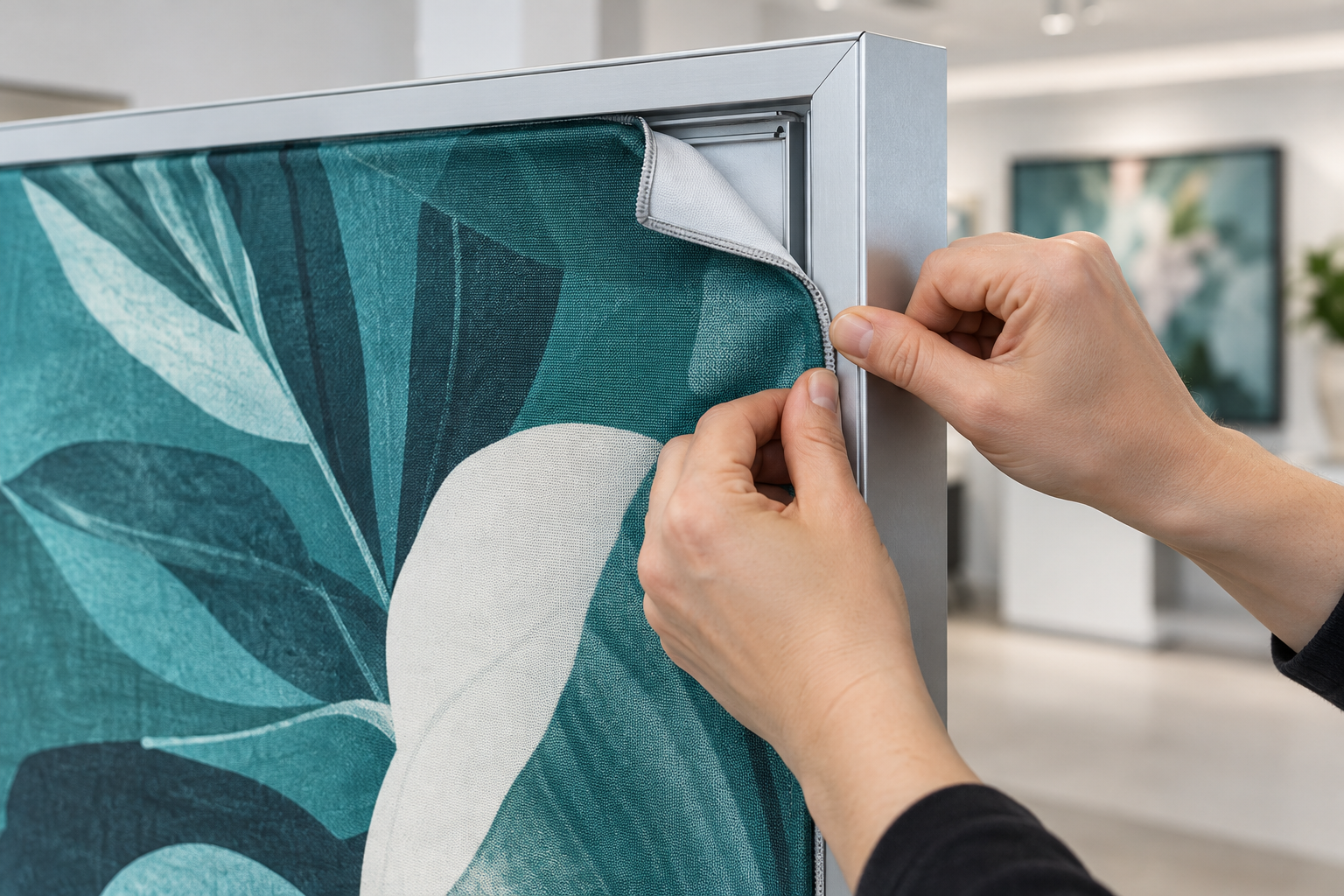
Check the New Graphic
Inspect the replacement before removing the old graphic. A basic check normally takes 2–5 minutes and can prevent a much longer delay if the new graphic has the wrong size, artwork, material, or silicone strip.
Lay the graphic on a clean surface and check:
- Frame name or identification number
- Graphic width and height
- Top and bottom direction
- Front or rear position
- Panel number
- Frontlit or backlit material
- Campaign or artwork version
- Silicone strip condition
- Stitching quality
- Pull-tab position
Look for cuts, stains, loose threads, damaged corners, missing silicone, white stress marks, print scratches, color bands, or deep fold lines.
Check all names, prices, dates, phone numbers, and other important text. Scan each QR code and confirm that it opens the correct live page.
For a backlit graphic, hold part of the fabric in front of an even light source. Thin print areas, scratches, oil marks, and uneven color density are often easier to see when light passes through the fabric.
Make Sure the Graphic Matches the Frame
An SEG graphic has a flexible silicone strip sewn around its edge. The strip fits into a narrow channel in the aluminum frame and pulls the fabric smooth.
Do not order a replacement using only the outside frame dimensions. Two frames can have the same outside size but use different channel positions, silicone profiles, and graphic measurements.
Before ordering a replacement, confirm:
- Frame brand or profile number
- The supplier’s required measurement points
- Silicone width, thickness, and shape
- Stitching position
- Frontlit or backlit use
- Graphic orientation
There is no fixed amount or percentage that should always be subtracted from the frame size. The correct finished size depends on the frame channel, silicone strip, fabric stretch, and supplier’s production method.
This is especially important when several panels are used in an aluminum exhibition booth. Label each frame and graphic so similar panels are not mixed during setup.
Inspect the Frame and Channel
The graphic will not sit evenly if the frame is loose, twisted, dirty, or assembled incorrectly.
Check that:
- All frame sections are fully connected
- Corner joints are closed
- Locks and connectors are secure
- The feet are level and stable
- The frame does not rock
- The channel is open and continuous
- No screw or sharp edge touches the graphic
- No cable is trapped in the channel
For a rectangular frame, measure both diagonals from corner to corner. If the measurements are clearly different or one corner sits out of line, loosen the connections and square the frame before installing the graphic.
Do not try to correct a twisted frame by pulling the fabric harder. This can damage the stitching without fixing the frame.
Wipe the channel with a clean cloth. Use a soft brush or low-suction vacuum for narrow areas. Check the corners carefully because dust, thread, tape, and packing material often collect where two frame sections meet.
Do not pour cleaning liquid into the channel. Liquid may remain inside the frame or reach electrical parts in a lightbox.
A badly bent or crushed channel should be repaired before installation. Forcing the silicone into a damaged area can cut the strip, break the stitching, or cause the edge to come out later.
Prepare the Work Area
SEG fabric picks up dirt easily, especially when the artwork contains white or light-colored areas.
Prepare:
- Clean, dry gloves
- A clean table or protected floor covering
- A microfiber cloth
- A labeled storage bag
- A smooth plastic fitting tool, if approved
- A stable ladder when needed
- A second installer for large or high graphics
Remove rings, watches, badges, and tools that may catch the fabric. Keep food, drinks, markers, knives, and open toolboxes away from the graphic.
Never place the printed fabric directly on an exhibition hall floor. Dust, oil, tape residue, water, and small metal pieces can stain or scratch it.
As a practical guide, consider using two installers when the graphic is wider than about 1.5 m, taller than about 2 m, or installed above shoulder height. A smaller graphic may also need two people if one person cannot keep it under control and off the floor.
Disconnect the Lightbox Power
For an LED lightbox, switch off and disconnect the power before removing the graphic or reaching inside the frame. Using the lightbox control button may not fully isolate the electrical supply.
NIOSH recommends de-energizing electrical circuits before work begins and states that electrical work should be completed by qualified people.[1]
Stop work if you notice:
- Exposed wires
- Damaged insulation
- Burn marks
- Loose connectors
- Melted parts
- Strong heat
- A burning smell
- Repeated flickering
Do not cover an electrical problem with a new graphic. Damaged wiring, LED drivers, connectors, and power supplies should be checked by a qualified person.
Remove the Old Graphic
Start at a corner with a pull tab. Hold the tab close to the silicone strip and release about 10–20 cm of the edge.
If there is no pull tab, carefully lift the silicone with clean fingers. When it cannot be removed by hand, use only a smooth tool approved for the frame.
Continue along the nearby edges in sections of about 10–20 cm. Short sections are easier to control and place less sudden force on the seam than pulling out a full side at once.
Support the loose fabric as it comes out so it does not fall or drag across the floor.
Avoid:
- Pulling from the middle of the printed fabric
- Removing a full side in one hard pull
- Using a screwdriver or knife
- Cutting the silicone strip
- Twisting the fabric into a rope
- Letting the graphic hang from one corner
If the silicone is stuck, check for a crushed channel, folded fabric, glue, dirt, or an incompatible silicone profile. Do not force a sharp tool into the slot.
Once removed, inspect the old graphic before packing it. Check the silicone strip, stitching, pull tabs, printed surface, and corners for damage.
Find the Top and Viewing Side
Before fitting the new graphic, confirm its direction using the printed text, logos, faces, product images, panel numbers, labels, and pull-tab position.
Hold the graphic loosely in front of the frame and step back. Make sure it is upright and belongs to that frame.
For a double-sided display, check which graphic belongs on the front and which belongs on the back. The two sides may use different artwork, languages, or offers.
Fit the Four Corners
Start with one top corner. Turn the silicone strip in the direction required by the frame and insert about 5–10 cm of the edge. This is normally enough to hold the corner while leaving the rest of the side loose.
The narrow stitched fabric edge may fold toward the channel as the silicone is inserted. Do not push a large fold of the visible printed fabric deep into the slot. When the correct direction is unclear, compare the new graphic with the old one or ask the supplier.
Fit the opposite top corner, followed by the two bottom corners. At this stage, all four corners should be held in place while most of the edges remain loose.
If the fourth corner will not reach without hard pulling, stop and check:
- Graphic size and label
- Top and bottom direction
- Frame assembly
- Frame diagonals
- Silicone direction
- Folded fabric in another corner
- Dirt or damage inside the channel
A correctly matched graphic should feel firm, but it should not require enough force to stretch the seam or move the frame.
Secure the Four Midpoints
After the corners are in place, insert the center of each side in this order:
- Top center
- Bottom center
- Left center
- Right center
The graphic now has eight main positioning points: four corners and four side midpoints. These points keep the graphic centered and divide the perimeter into shorter, easier sections.
On a very large graphic, also secure the quarter points before filling the remaining gaps.
Do not finish one full side before positioning the other sides. This can push most of the remaining tension toward the last corner.
Fill the Remaining Edges
Work from each midpoint toward the corners. Fit about 10–20 cm of the edge at one time and alternate between opposite sides.
For example:
- Top center toward the left
- Bottom center toward the right
- Top center toward the right
- Bottom center toward the left
- Left center toward both corners
- Right center toward both corners
The exact order can change, but both sides should be filled at a similar rate.
Use your thumb or a smooth plastic tool approved for the frame. Press the silicone toward the channel without pulling the printed fabric outward.
Do not try to insert 50 cm or more in one movement. Long sections are harder to control and can move extra material toward one corner.
Do not stretch the silicone strip lengthwise or slide it through the channel. If the strip twists, remove that short section and insert it again.
When a tool is needed around most of the frame, stop and check the silicone size, insertion direction, graphic dimensions, and channel condition.
Check the Finished Surface
Inspect the edge from about 30–50 cm away. This distance makes it easier to find exposed stitching, dirt, partly inserted silicone, folded fabric, and loose threads.
Make sure:
- The silicone is fully inside the channel
- No stitching is exposed
- No fabric is folded unevenly
- All corners lie flat
- No edge sits higher than the others
- The pull tab remains accessible
Then step back about 2–3 m and check the overall appearance from a normal viewing distance.
Look for:
- Diagonal wrinkles
- Horizontal or vertical waves
- Bent text
- Uneven borders
- Loose corners
- Off-center artwork
- Misaligned panel joints
Do not rub the middle of the graphic to remove a wrinkle. Release the nearby edge, allow the fabric to relax, and fit that section again.
For a local diagonal wrinkle, start by releasing about 20–40 cm along both sides of the nearest corner, or continue until the affected area becomes loose. A small frame may need less, while a large graphic may need a longer section.
If the wrinkle moves or disappears when the edge is released, the problem is probably caused by uneven fitting. If it stays in the same place while the fabric is loose, check for a print fault, sewing problem, stretched fabric, or permanent crease.
Fix Common Problems
| Problem | Possible Cause | What to Do |
|---|---|---|
| Diagonal wrinkle | Uneven corner tension, folded fabric, off-center fitting, or a twisted frame | Release the nearest corner and part of both nearby edges. Let the fabric relax, then refit the corner and work back toward the midpoints. |
| Horizontal waves | Uneven side tension, a graphic that is too tall, or side edges that are not fully inserted | Check both vertical sides and refit them in alternating sections. |
| Vertical waves | Uneven top and bottom tension, a graphic that is too wide, or a partly inserted bottom edge | Release the affected top and bottom sections and refit them from the center outward. |
| Loose corner | Silicone not fully inserted, damaged channel, loose stitching, or an oversized graphic | Remove the corner and inspect the strip, seam, and channel. Repair damaged parts instead of adding tape or glue. |
| Tight corner | Wrong direction, folded edge, backward silicone, frame not square, or incorrect graphic size | Release the nearby edges, check the other corners, and restart with the four-corner method. |
| Silicone keeps coming out | Incomplete insertion, wrong silicone size, too much tension, or a damaged channel | Check that the graphic belongs to the frame and inspect the channel. Do not use glue. |
| Graphic remains loose | Oversized graphic, stretched fabric, wrong panel, or frame assembled too small | Confirm that every edge is fully inserted, then check the frame and graphic measurements. |
| Artwork is off-center | Corners or midpoints were placed unevenly | Release enough of all four sides for the fabric to relax, then start again with the corners and midpoints. |
| Text remains bent | Uneven tension or a permanent print, cutting, or sewing fault | Refit the nearest edge. If the text remains bent while the fabric is loose, contact the graphic supplier. |
Check a Backlit Graphic
Backlighting makes small print defects, stains, thin color areas, cable shadows, and lighting faults easier to see.
Before installing the new graphic:
- Remove the old graphic.
- Make sure no one is touching the inside of the frame.
- Turn on the empty lightbox briefly.
- Check for failed LEDs, dark areas, bright spots, and cable shadows.
- Turn off and disconnect the power again.
- Install the new graphic.
After installation, turn the lightbox on and look for:
- Dark bands
- Bright LED spots
- Uneven brightness
- Internal shadows
- Thin print areas
- Scratches or oil marks
- Weak black areas
Check the lightbox from about 2–3 m away, then move closer to inspect any problem area. If a dark mark stays in the same frame position after the graphic is loosened, the problem is probably inside the lightbox. If the mark moves with the graphic, inspect the fabric and print.
Frontlit and backlit fabrics may use different materials and print densities. Confirm the material before ordering a replacement for an LED lightbox display.
For more information about portable illuminated frames, see this guide to portable SEG lightboxes.
Handle Large and Multi-Panel Graphics
Large graphics should be installed by two people when one person cannot control the top edge, support the loose fabric, and keep it off the floor.
For a wide tension fabric backdrop booth:
- Fit both top corners.
- Support the center of the fabric.
- Fit both bottom corners.
- Secure the top and bottom midpoints.
- Secure the side midpoints.
- Fill the remaining sections evenly.
Once the frame and work area are ready, two experienced installers may change a large wall graphic in about 10–20 minutes. This time does not include building the frame, repairing electrical parts, cleaning heavy dirt, or correcting a wrongly made graphic.
Use a proper ladder or work platform for high panels. OSHA requires portable ladders to be placed on stable, level surfaces unless they are secured, and a ladder must not be moved while someone is standing on it.[2]
Do not stand on transport cases, chairs, counters, boxes, or frame crossbars.
For multi-panel artwork, follow the panel labels and supplied installation order. Before adjusting the fabric, check that all frames are at the same height, the floor is level, panel gaps are even, and the panels belong to the same print set.
Stand about 2–3 m from the finished wall to check text lines, product edges, faces, and background patterns across the panel joints.
Make Future Changes Faster
A well-labeled system saves more time than pulling the graphic out quickly. Keep each graphic with the correct frame information and setup instructions.
Place a label on both the storage bag and the back edge of the graphic. Include:
- Graphic name
- Frame identification
- Width and height
- Top direction
- Panel position
- Front or rear side
- Frontlit or backlit use
- Campaign version
A properly sewn pull tab also makes removal easier. Do not make a pull tab by cutting, stapling, or gluing a finished graphic.
Test every new graphic on its intended frame before shipping it to an event. Allow at least 5–10 minutes for a basic test on a small frame and longer for a large or multi-panel display.
A test fit can reveal:
- Wrong dimensions
- Missing panels
- Incorrect direction
- Damaged stitching
- Tight silicone
- Print errors
- Lighting problems
Take a front-facing photo after the test and record any special fitting detail. This is useful when different teams use the same interchangeable SEG fabric display at several events.
Pack and Store the Graphic
Make sure the graphic is clean and completely dry before packing it.
Follow the supplier’s instructions because not every fabric, ink, coating, silicone strip, or seam should be handled in the same way.
When folding is allowed:
- Use as few folds as possible
- Fold loosely
- Avoid sharp creases
- Protect the printed face
- Keep dirty silicone away from light-colored print
- Do not place heavy objects on top
For long-term storage of a large flat graphic, rolling may reduce hard fold lines. Use a clean support tube that is longer than the graphic width. A tube with a diameter of about 8–15 cm is a practical starting point for many medium and large graphics, but a wider tube may be better for thick or very large material.
Roll with even tension and protect the outside surface. General textile-storage guidance also recommends using an inner support tube, choosing a tube longer than the textile width, and using two people to roll large pieces evenly.[3]
Do not store a wet graphic in a sealed bag. The U.S. Environmental Protection Agency recommends drying damp or wet materials within 24–48 hours to reduce the chance of mold growth.[4]
Store graphics away from water, direct sunlight, high heat, sharp objects, chemicals, and dirty hardware. Label each bag with the last inspection date and any known damage.
Clean the Graphic Carefully
Do not assume that every SEG graphic is machine washable. Cleaning depends on the fabric, ink, coating, stitching, and silicone material.
Start with the mildest method:
- Use a soft brush for loose dust
- Use a low-suction vacuum when approved
- Test any cleaner on a hidden area
- Blot small marks instead of scrubbing them
Avoid bleach, strong solvents, hot irons, heat guns, direct steam, boiling water, and hard scrubbing unless the graphic supplier has approved the method.
Heat can shrink the fabric, change the print, damage coatings, deform the silicone strip, or weaken the stitching. The graphic must be completely dry before it is installed or packed.
When to Repair or Replace the Graphic
Refitting the graphic can usually correct:
- Uneven tension
- Off-center artwork
- Twisted silicone
- Partly inserted edges
- Folded corners
- Light packing wrinkles
Repair or replacement is normally needed when there is:
- Torn fabric
- Broken stitching
- Silicone separating from the seam
- Permanent stretching
- Severe fading
- Mold
- Incorrect artwork
- Deep permanent creases
- Damaged print coating
- Poor backlit print density
Stop fitting the graphic if the seam begins to open. Continuing to pull it may turn a small repair into a full replacement.
Final Checklist
- The correct graphic is installed
- The artwork is upright
- Front and rear panels are in the correct positions
- All four corners are secure
- All four side midpoints are correctly positioned
- The silicone is fully inserted
- No stitching is visible
- The surface is smooth
- Text and borders are straight
- The frame is stable
- Multi-panel artwork is aligned
- Lighting is even
- The old graphic is clean, dry, labeled, and packed
Conclusion
A reliable SEG graphic change uses eight main positioning points: four corners and four side midpoints. Insert about 5–10 cm at each corner, then fit the remaining edge in 10–20 cm sections from the center outward. Check the channel from 30–50 cm away and review the full design from 2–3 m. A small prepared frame may take 5–10 minutes, while a large panel may take 10–20 minutes with two people. Stop if the seam opens, the frame moves, or a corner needs hard pulling. Correct the frame, size, edge direction, or channel problem before continuing.


