Choose a backlit display when the graphic must attract attention from a distance or remain bright in a poorly lit venue. Choose a frontlit display when lower weight, simpler setup, detailed information, or lower total cost matters more. For many trade show booths, the most practical solution is one backlit main wall supported by frontlit information panels.
Both systems can cover small booths and large exhibition walls. For example, MILIN’s SEG LED lightbox booth can be customized from 3 ft to 33 ft and beyond, or about 0.9 m to more than 10 m wide. Its tension fabric backdrop is available from 3 ft to 65 ft, or about 0.9 m to 19.8 m wide. Size alone does not decide which system is better. The decision depends on the graphic, venue lighting, power access, shipping limits, setup time, and number of planned events.
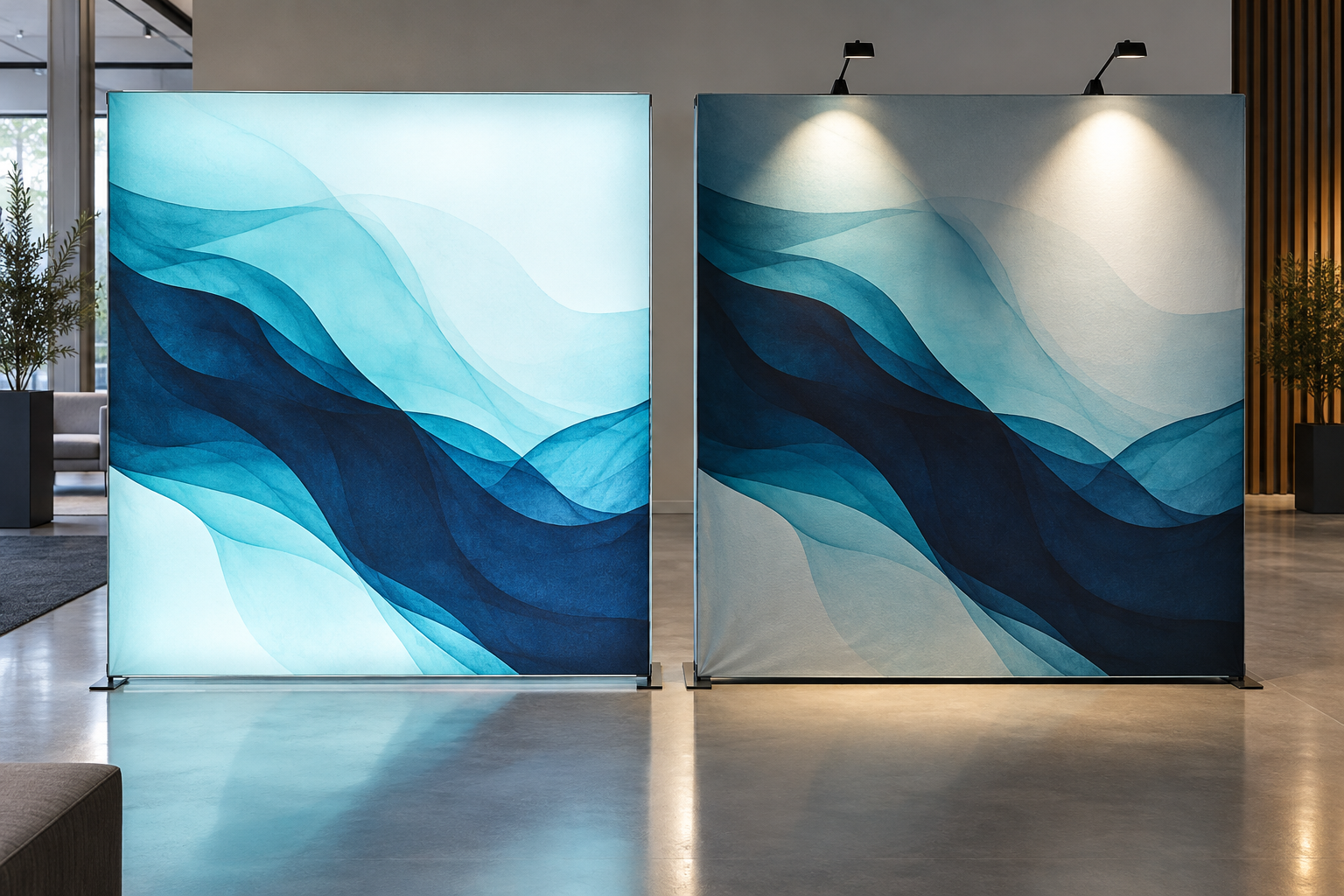
Backlit vs Frontlit Display Comparison
| Factor | Backlit Display | Frontlit Display |
|---|---|---|
| Light source | LEDs behind the graphic | Hall lights or lamps in front of the graphic |
| Graphic material | Translucent backlit fabric | Opaque tension fabric or SEG fabric |
| Visual effect | Bright and easy to notice from a distance | Natural printed appearance |
| Control over lighting | High because the wall has its own light | Depends on the venue or added spotlights |
| Initial cost | Usually higher | Usually lower |
| Frame depth | Usually deeper | Usually thinner |
| Electricity | Required | Not always required |
| Setup | Includes cables, LEDs, and power supplies | Usually has fewer parts |
| Packed weight | Usually heavier for the same wall size | Usually lighter for the same wall size |
| Best graphic content | Large images, logos, and short messages | Specifications, diagrams, and detailed information |
| Main risks | LED dots, dark areas, color changes, or wiring faults | Glare, shadows, and weak or uneven lighting |
| Graphic replacement | Easy when the correct SEG specification is used | Easy with tension fabric or SEG systems |
This comparison focuses on backlit SEG lightboxes and frontlit SEG or tension fabric walls. It does not compare a fabric lightbox with unrelated products such as paper posters, roll-up banners, or heavy rigid display panels.
How Each Display Works
A backlit display places LEDs behind a translucent graphic. Light passes through the printed fabric, making the complete image appear illuminated.
A typical single-sided backlit wall contains:
- An aluminum frame
- LED strips or LED modules
- One or more power supplies
- A translucent printed graphic
- A rear blockout or reflective layer
Many exhibition lightboxes use silicone edge graphics, known as SEG. A silicone strip is sewn around the edge of the fabric and pushed into a channel in the aluminum frame. This stretches the graphic and hides the edge of the frame.
Backlit frames normally use one of two lighting methods:
Direct-lit systems place LEDs behind the graphic and point them toward the front. They are common in larger exhibition walls. The frame must be deep enough for the light to spread before it reaches the fabric. If the frame is too shallow or the LEDs are too far apart, individual bright dots may be visible.
Edge-lit systems place LEDs around a light guide panel. They can create a thinner display, but poor light-guide design may cause bright edges and a darker center. Scratches or dust on the panel may also affect the result.
A frontlit display does not have LEDs behind the graphic. Light reaches the printed surface from the viewer’s side. The light may come from:
- Exhibition hall ceiling lights
- Spotlights mounted above the wall
- Track lights
- Lamps attached to the booth
- Natural light near an entrance or window
A basic frontlit wall may only need an aluminum frame, feet, connectors, and one opaque fabric graphic. It normally has fewer parts than a similar-sized lightbox.
The main weakness is that the result depends on the venue. A graphic that looks bright in a supplier’s showroom may look dull in a dark corner of an exhibition hall. Adding spotlights improves control, but it also adds cables, brackets, electricity, and setup work.
Size and Booth Layout
Both display types can be built in large sizes, but the larger the wall becomes, the more important its frame strength, lighting layout, packing method, and graphic panel arrangement become.
A 3 m × 2.4 m wall has a graphic area of:
3 m × 2.4 m = 7.2 m²
This number is useful when comparing power, printing, replacement graphics, and shipping. Suppliers should quote the same finished wall size so the comparison is fair.
For a large backlit wall, ask:
- How many lighting sections are used?
- How many power supplies are required?
- Where are the frame joints?
- Will the graphic be printed as one piece or several panels?
- Can one failed section be replaced separately?
For a large frontlit wall, ask:
- How many frame supports are needed?
- How many lamps are needed for even coverage?
- Will visitors cast shadows over the lower part?
- Can the graphic be produced as one piece?
- Will the packed profiles fit through the venue doors and elevators?
If the booth also needs monitors, storage rooms, counters, or product shelves, a basic graphic wall may not be enough. A reinforced modular aluminum exhibition booth may be more suitable because the structural parts and graphic parts can be planned separately.
Brightness and Light Uniformity
Backlit displays give you more control over brightness because the wall has its own light source. This is useful when the hall is dark, the ceiling is high, or nearby booths may block overhead lighting.
However, the brightest wall is not always the best wall. Too much light can:
- Wash out pale colors
- Make thin text harder to read
- Overpower nearby screens
- Make products in front of the wall look dark
- Create uncomfortable glare
Uniformity is usually more important than maximum brightness. A good backlit wall should not show individual LED dots, dark corners, support-bar shadows, or different color tones between sections.
Do not check only the center of the wall. Inspect at least nine areas:
- One point in the center
- Four corners
- The midpoint of the top edge
- The midpoint of the bottom edge
- The midpoint of the left edge
- The midpoint of the right edge
Also inspect every frame joint, support bar, and lighting zone. A single bright center reading does not prove that the complete wall is evenly illuminated.
Ask the supplier to test the exact wall size with plain white, light gray, and flat-color graphics. These simple images reveal LED dots, dark areas, and color differences more clearly than a busy photograph.
Frontlit walls can also have uneven lighting. One narrow spotlight above a wide wall may create a bright center and dark sides. Visitors standing close to the wall may cast shadows over the lower text.
Suppliers may describe a backlit surface using luminance and a frontlit surface using illuminance. Luminance is measured in candela per square meter, while illuminance is measured in lux. These are different measurements and should not be compared as though they were the same number.[1]
When a supplier provides a lighting figure, ask for:
- The unit used
- The test image
- The number of measurement points
- The ambient light conditions
- The dimming level
- Whether the result is an average or a center reading
Color and Print Quality
Backlit and frontlit graphics should not be printed or approved in the same way.
Light passes through a backlit graphic. This can make pale colors look washed out and dark colors look weaker. A print that looks correct on a table may change after it is installed and illuminated.
A backlit print sample should include:
- The company logo
- Important brand colors
- Skin tones
- Pure white
- Neutral gray
- Dark shadows
- Large gradients
- Fine lines and small text
The sample should be printed on the actual production fabric and tested on the intended lightbox. A computer screen cannot show how much light will pass through the ink and fabric.
Adding more ink is not always the answer. Too much ink may block light, reduce image detail, or create uneven color. The printer must balance color strength with light transmission.
Frontlit graphics are normally easier to judge because the viewer sees reflected light. However, the type of lamp still affects the result. Warm light can make white areas look yellow, while cool light can make skin tones and gray areas look blue.
Matte fabric normally reduces reflections. Glossy materials may make colors look deeper, but spotlights can create glare that hides text or product details.
Brightness, color, glare, and flicker are separate parts of lighting quality. A wall can be bright but still have poor color or uncomfortable glare.[2]
Text and Graphic Content
Backlighting is most useful when visitors can understand the message in a few seconds.
Good content for a backlit wall includes:
- One large product image
- A short headline
- A clear logo
- A product launch message
- Food, beauty, travel, fashion, or automotive photography
A backlit wall should not be filled with long paragraphs, several small photographs, and many competing messages. The extra light adds little value when visitors must stand close and read dense information.
Frontlit walls are often more practical for:
- Product specifications
- Technical diagrams
- Comparison tables
- Maps and schedules
- Several product categories
- Distributor or contact information
Frontlit graphics should still be easy to scan. Use short sections, clear headings, and enough empty space between different topics.
For backlit text:
- Use medium or bold font weights
- Keep strong contrast
- Avoid pale gray text
- Avoid thin white lines over bright photographs
- Keep paragraphs short
- Test the design with the LEDs switched on
Print a full-size section before production. Check the headline from the aisle and smaller text from the distance where a visitor is expected to stop.
Power Use and Running Cost
Do not assume that all lightboxes use the same amount of electricity. Power depends on the wall area, LED type, LED spacing, brightness, number of illuminated sides, and power-supply efficiency.
Use the supplier’s complete system wattage to calculate energy use.
For example, assume a 3 m × 2.4 m lightbox has an area of 7.2 m² and the supplier quotes a complete power rating of 420 W.
- Power per square meter: 420 W ÷ 7.2 m² = about 58 W/m²
- Energy used in 10 hours: 420 W × 10 hours = 4.2 kWh
- Energy used over a three-day show: 4.2 kWh × 3 = 12.6 kWh
This is a calculation example, not a standard rating for all lightboxes. Replace 420 W with the actual figure provided for the wall you are buying.
Also ask whether the quoted wattage includes:
- All LED modules
- Power-supply losses
- Dimmers and controllers
- Lighting on both sides
- Illuminated counters or attached signs
A frontlit wall may use no extra electricity when the hall lighting is sufficient. If spotlights are added, include their wattage, number, and daily operating time in the same calculation.
Setup Time and Labor
A basic frontlit wall normally has fewer setup steps. The team connects the frame, installs the feet, fits the fabric, and adds lamps if needed.
A backlit wall also requires the team to connect the lighting cables, install power supplies, fit the rear layer, test every lighting section, and secure the cables.
A backlit system can still be quick to install when it has:
- Numbered frame parts
- Preinstalled LEDs
- Color-coded cables
- Tool-free connectors
- Clearly labeled power supplies
- Separate case compartments
MILIN states that its standard 10 × 20 ft quick-lock backwall can be assembled by two people in under 30 minutes. This is a supplier-specific figure for that system, not a standard installation time for every exhibition wall.
When checking a setup claim, ask:
- How many installers were used?
- Had they assembled the system before?
- Did the timing start when the cases were opened?
- Did it include fitting the graphics?
- Did it include connecting and testing the lights?
- Did it include cable management and removing the packaging?
A case study is also more useful when its conditions are clear. In MILIN’s DRYPAX setup case, a 3 m backlit booth was assembled with video guidance, and the company reported that the customer reduced on-site assembly time by two hours. This does not mean every 3 m booth will save two hours, but it shows the value of clear labels and a complete setup video.
Electrical Safety and Camera Flicker
Ask for the power requirements of the complete wall, not only the rating of one LED strip.
Confirm:
- Total system wattage
- Input voltage and frequency
- Plug type
- Number of power supplies
- Number of outlets required
- Cable lengths
- Maximum connected sections
- Whether a dimmer is included
- Recommended spare parts
Power supplies need the ventilation and clearance required by the manufacturer. Do not wrap operating power supplies tightly in fabric or place them inside closed packing spaces.
Cables should not pass through sharp frame joints or places where doors, cases, or visitors may damage them. OSHA states that flexible cords and cables must be protected from sharp corners, projections, doorways, and other pinch points.[3]
A travel adapter changes the plug shape. It does not change an incompatible voltage, frequency, or power rating.
LEDs may appear steady to the eye but show flicker or dark bands on a camera. The result can change with the LED driver, dimmer setting, camera shutter speed, and electrical load.
The U.S. Department of Energy explains that LED flicker can vary with frequency and driver design, so practical testing is important when a lighted wall will appear in photographs or video.[4]
Before the event, test the wall with:
- The phones used by the event team
- The main photography camera
- Video and livestreaming equipment
- The planned dimming level
- A person or product standing in front of the wall
Fire and Venue Rules
Exhibition venues may require flame-retardant documents for the front graphic, rear blockout fabric, diffuser, ceiling fabric, and other booth materials.
Do not accept a general statement such as “fireproof fabric.” The document should identify the actual material supplied.
The Javits Center requires many materials used in booth construction and decoration to be fire-retardant. Depending on the event, exhibitors may need labels, certificates, paperwork available on site, or a field flame test.[5]
Before shipping, ask the organizer whether it needs:
- A laboratory test report
- A manufacturer certificate
- A material label
- A physical sample
- Advance document submission
- An on-site inspection
A certificate for one power supply does not automatically cover the complete lightbox, wiring, connectors, frame, and installation method. Ask which document applies to each part.
Shipping, Cases, and Storage
For the same wall size, a backlit display normally has more packed parts because it includes LEDs, power supplies, cables, rear fabric, and deeper frame sections.
Do not compare only total shipment weight. Ask for four separate figures:
- Total gross weight
- Number of cases
- Weight of the heaviest case
- Length of the longest case
The heaviest case determines whether one person can move it. The longest case determines whether it can pass through elevators, hotel corridors, loading doors, and booth entrances.
Shipping companies may charge by dimensional weight, so a long but light case can still be expensive.
Before each event:
- Test every LED section
- Test each power supply
- Inspect cables and connectors
- Check the silicone edges and stitching
- Confirm all feet, bases, and fasteners are packed
- Check case wheels, handles, and latches
Store fabric graphics clean and dry. Do not place heavy equipment on the silicone edges. Some fabrics can be folded, while others should be rolled. Follow the material supplier’s instructions.
Graphic Replacement and Reuse
Both backlit and frontlit SEG systems can use replacement graphics. The frame can remain in service while the printed fabric changes for a new product, event, language, or campaign.
A replacement printer needs more than the visible wall size. Provide:
- The finished graphic size
- The visible opening size
- The silicone strip width and thickness
- The stitch position
- The fabric specification
- The required stretch
- The print direction
- The frame model
Two frames with the same visible size may not accept the same SEG graphic. Their channel position, silicone size, and fabric stretch may be different.
For more information on changing graphics without replacing the frame, see MILIN’s guide to interchangeable SEG fabric displays.
Total Cost Over Several Events
Do not compare only the frame price. Calculate the complete cost of buying, using, moving, and maintaining the display.
Include:
- Frame and graphics
- LEDs, lamps, and power supplies
- Transport cases
- Freight and dimensional-weight charges
- Venue handling
- Installation labor
- Electricity
- Storage
- Replacement graphics
- Spare parts and repairs
A simple calculation is:
Total cost over the planned period ÷ number of events = cost per event
For example, if a complete display costs $6,000 and is used at 12 events, the basic purchase cost is:
$6,000 ÷ 12 = $500 per event
This figure does not yet include freight, labor, power, storage, or replacement graphics. Add those costs before comparing it with a rental or another display system.
Use the same assumptions for both options. A backlit quotation that includes graphics, cases, and lighting should not be compared with a frontlit quotation that excludes spotlights, cases, or graphics.
| Data to Compare | Backlit Quote | Frontlit Quote |
|---|---|---|
| Finished wall size | ||
| Total graphic area | ||
| Total system wattage | ||
| Number of cases | ||
| Total packed weight | ||
| Heaviest case | ||
| Longest case | ||
| Number of installers | ||
| Complete setup time | ||
| Replacement graphic cost |
Which Display Should You Choose?
| Booth Need | Better Starting Choice | Reason |
|---|---|---|
| Main image must be seen from a distant aisle | Backlit | The wall creates its own light |
| Venue lighting is dark or uncertain | Backlit | Less dependence on ceiling lights |
| Wall contains specifications and diagrams | Frontlit | Easier to plan for close reading |
| Low packed weight is important | Frontlit | Fewer electrical parts and thinner frames |
| Power is costly or unavailable | Frontlit | May work with existing venue lighting |
| One visual must stand out, but other walls carry information | Use both | Backlight only the main focal area |
| Content changes frequently during the event | Add an LED screen | Video and digital content can be changed without reprinting |
A practical mixed booth may use one backlit logo wall, several frontlit specification panels, spotlights on physical products, and an LED screen for video or changing content.
In one MILIN project, a 6 m tension fabric wall was combined with 2.5 m backlit towers. The large frontlit wall formed the main booth boundary, while the smaller illuminated towers highlighted selected products. This is a useful example of placing backlighting only where it adds clear value.
Sustainability Claims
A display is not automatically sustainable because it uses aluminum, fabric, or LEDs. Consider how many times it will be reused, how far it will be shipped, whether individual parts can be repaired, and how often the graphics must be replaced.
Avoid broad claims such as “green” or “eco-friendly” unless they can be supported. The U.S. Federal Trade Commission advises businesses not to make broad environmental claims without clear and specific evidence.[6]
Use specific statements instead, such as:
- The aluminum frame can be reused
- The fabric graphic can be replaced
- Individual LED bars can be repaired
- The shipping case can be used again
- The product contains a stated percentage of recycled material
Questions to Ask Before Ordering
- Is the lightbox direct-lit or edge-lit?
- What are the exact assembled dimensions?
- What is the complete installed depth, including feet and rear parts?
- What is the complete system wattage?
- What voltage and plug type are required?
- How were brightness and uniformity checked?
- Can you provide white and light-gray test images?
- What exact graphic fabric should be used?
- Can I test a printed sample on the actual frame?
- What are the packed dimensions and total gross weight?
- What is the weight of the heaviest case?
- How many people are needed for setup?
- Does the setup time include graphics, cables, and final testing?
- Can LED bars and power supplies be replaced separately?
- What spare parts should travel with the booth?
- What fire and electrical documents are available?
- Can another printer produce replacement graphics?
- Can the frame safely support monitors or shelves?
- What is included in the warranty?
- How long will replacement parts remain available?
Conclusion
Choose backlit for the part of the booth that must be seen first, such as a main logo wall, a large product image, or a launch message. Use frontlit walls for specifications, diagrams, meeting areas, and secondary graphics. Before ordering, compare at least ten figures, including wall area, total wattage, packed weight, heaviest case, longest case, crew size, setup time, and replacement graphic cost. For a backlit wall, inspect at least nine lighting positions and test a real printed sample. These checks are more useful than general claims such as “high brightness,” “lightweight,” or “easy setup.”


